
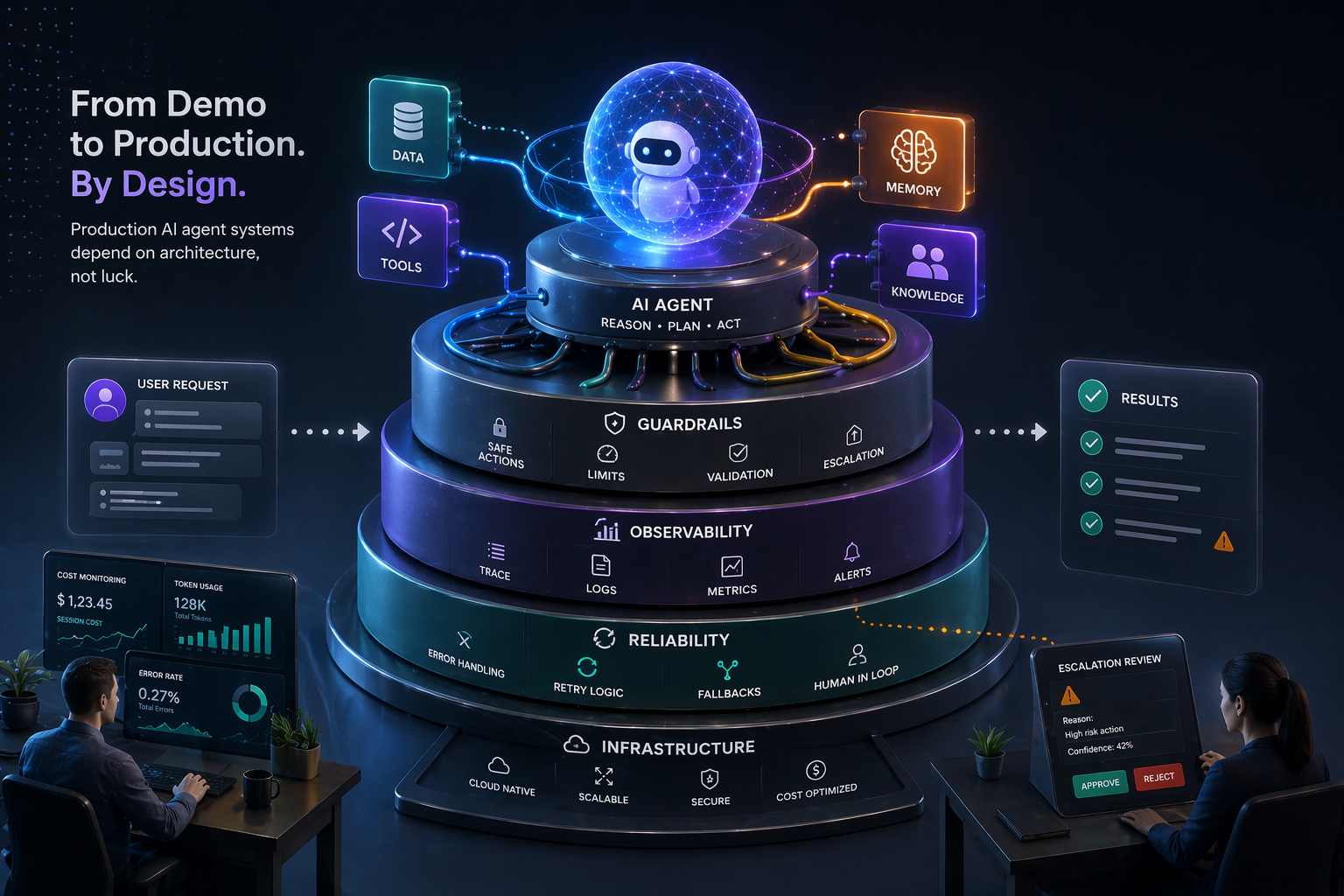
Your AI Agent Demo Worked Perfectly. Your AI Agent in Production Will Not. Unless You Read This.
Every AI agent demo follows the same script: the agent receives a complex task, reasons through it step by step, calls the right tools in the right order, and delivers a polished result. The audience applauds. The budget is approved.
Then the agent goes to production.
The first week, it hallucinates a tool that does not exist and enters an infinite retry loop. The second week, it generates a plan with 47 steps for a task that should take 3. The third week, it spends $2,400 in API costs on a single customer request because nobody set a token budget. By the fourth week, the team is manually reviewing every agent action, defeating the entire purpose of autonomy.
The gap between demo and production is not intelligence. It is architecture.
In this guide: The 5 production readiness dimensions every agent system must address, 5 architecture patterns with diagrams and production requirements, and a decision framework for choosing the right pattern for your use case.
What Is Production AI Agent Architecture?
Production AI agent architecture refers to the structural design choices — patterns, guardrails, memory systems, and cost controls — that determine whether an AI agent system is reliable, observable, and economically viable at enterprise scale. A demo agent works when everything goes right. A production agent is architected to handle everything that goes wrong: tool failures, hallucinated plans, runaway costs, infinite loops, and partial results.
The five dimensions that separate production-grade agent systems from demos are: guardrails, observability, memory architecture, cost management, and error recovery. Every architecture pattern below must address all five before deployment.
The Production Readiness Checklist
1. Guardrails
- Action boundaries: Explicit whitelist of permitted actions — not “the agent can do anything except X,” but “the agent can ONLY do A, B, and C”
- Spending limits: Per-request token budget, per-hour cost ceiling, per-day maximum — hard limits, not guidelines
- Output validation: Every agent output passes through a validation layer before reaching the user or downstream system — check for hallucinated data, PII leakage, format compliance
- Escalation triggers: Defined conditions that halt autonomous execution and route to human review — confidence thresholds, cost thresholds, action severity thresholds
2. Observability
- Decision trace: For every action: what the agent decided, why, what alternatives it considered, and what data informed the decision
- Tool call logging: Every external tool call with parameters, response, latency, and cost
- Token accounting: Per-request and per-session token usage across all LLM calls, broken down by planning, execution, re-planning, and error recovery
- Dashboards: Real-time visibility into agent performance, cost, error rates, and human escalation rates
3. Memory Architecture
- Conversation memory: Current task context, managed within the context window or via summarization
- Working memory: Intermediate results during multi-step execution, persisted outside the context window
- Long-term memory: Cross-session knowledge — user preferences, learned patterns, accumulated decisions — via vector store or structured database
- Shared memory: For multi-agent systems, a common state store that all agents can read and write with concurrency controls
4. Cost Management
- Model tiering: Use the cheapest model that handles each sub-task — routing decisions on a smaller model, complex planning on a larger one. This can reduce costs 60–80%
- Caching: Cache tool call results for identical inputs, LLM responses for repeated queries, and intermediate planning results
- Token budgets: Hard limits per operation — when the budget is exhausted, the agent delivers its best result with remaining context, not a request for more tokens
- Batching: Where possible, batch multiple sub-tasks into a single LLM call rather than N separate calls
5. Error Recovery
- Tool failure: Retry with exponential backoff → try alternative tool → degrade gracefully → escalate to human. Never infinite retry.
- Planning failure: Re-plan from current state, not from scratch. Limit re-planning to 3 attempts.
- Hallucination detection: Validate tool names, parameter schemas, and output formats against known registries. Reject any tool call that does not match a registered tool.
- Infinite loop detection: Track state hashes. If the agent returns to a previously visited state, break the loop and escalate.
- Partial completion: If the agent cannot complete the full task, deliver whatever partial result is available with a clear status report. Partial value beats a timeout.
Five Production AI Agent Architecture Patterns
Pattern 1: Single Agent with Tool Belt
The simplest production pattern. One agent, one LLM, a set of tools, and guardrails.
User Request → Input Validation → Agent (LLM + Tools) → Output Validation → Response
                                        ↕
                                   Guardrail Layer
                                   (limits, boundaries, escalation)
Production requirements: Input sanitization (prevent prompt injection), tool call validation, output filtering for PII and hallucinations, token budget enforcement, timeout management.
Best for: Well-defined, single-domain tasks — customer support for a specific product area, data retrieval and formatting, report generation.
Scale limit: When tool count exceeds 15–20, tool selection accuracy degrades. When tasks span multiple domains, context becomes diluted.
Pattern 2: Router + Specialists
A lightweight router agent classifies the request and delegates to a specialized agent with its own tool set and system prompt.
User Request → Router Agent → Classification
                              → Specialist A (domain tools + prompt)
                              → Specialist B (domain tools + prompt)
                              → Specialist C (domain tools + prompt)
                            → Response
Production requirements: Router accuracy monitoring (misroutes are the primary failure mode), fallback handling when no specialist matches, specialist isolation so one failure does not cascade, load balancing.
Best for: Multi-domain support systems — healthcare triage across billing, clinical, and scheduling; enterprise helpdesks with distinct product lines.
Pattern 3: Orchestrator + Workers
An orchestrator decomposes tasks and dispatches parallel workers, then aggregates results.
User Request → Orchestrator → Decompose into subtasks
                            → Worker A (subtask 1) ──┐
                            → Worker B (subtask 2) ──┼→ Orchestrator aggregates → Response
                            → Worker C (subtask 3) ──┘
Production requirements: Timeout per worker (prevent one slow worker from blocking the response), partial result handling if a worker fails, result consistency validation across workers, per-worker cost tracking.
Best for: Research and analysis tasks, multi-source data aggregation, report compilation — anything decomposable into independent parallel subtasks.
Pattern 4: Planner-Executor (Sequential)
Separates planning from execution for complex sequential tasks where each step depends on the previous result.
User Request → Planner Agent → Step-by-step plan
             → Executor Agent → Execute step 1 → Result
                              → Execute step 2 → Result
                              → (Re-plan if needed, max 3×)
                              → Execute step N → Result
             → Final Response
Production requirements: Plan validation before execution (feasibility check, cost limit check), step-level checkpointing so failures resume from the failed step rather than restart, re-planning limits, plan versioning for audit trails.
Best for: Complex sequential workflows — data migration, multi-system configuration changes, any task where order of operations is critical.
Pattern 5: Supervised Autonomous Swarm
Multiple agents operating autonomously under a supervisor agent with global budget enforcement and human escalation.
Supervisor Agent → Spawns agents based on incoming work
                → Monitors agent health and progress
                → Enforces global cost/action budgets
                → Handles escalation to humans

Agent Pool:
  Agent A (monitoring) → Shared Memory ← Agent B (analysis)
  Agent C (action)     → Shared Memory ← Agent D (reporting)
Production requirements: Agent lifecycle management (spawn, monitor, restart, terminate), shared memory with concurrency controls, global budget enforcement across all agents, supervisor health monitoring, prioritized human escalation queue, graceful degradation under load.
Best for: Continuous operations — system monitoring, incident response, large-scale data processing, multi-department automation requiring sustained autonomous operation.
Choosing the Right Pattern
| Factor | Single Agent | Router | Orchestrator | Planner | Swarm |
|---|---|---|---|---|---|
| Task complexity | Low | Medium | Medium | High | Very High |
| Domains | 1 | Multiple | 1–3 | 1–2 | Multiple |
| Parallelism | None | Per-request | Per-subtask | None | Full |
| Build complexity | Low | Medium | Medium | High | Very High |
| Cost control | Easy | Medium | Medium | Hard | Very Hard |
Starting recommendation: Begin with Pattern 1 (Single Agent) for your first production use case. Prove the guardrails, observability, and cost management. Evolve to Pattern 2 (Router) as domains expand. Only move to Patterns 4–5 when production experience and task complexity demand it — not because the architecture is more impressive.
Frequently Asked Questions About Production AI Agent Architecture
What is the difference between a demo AI agent and a production AI agent? A demo agent works when everything goes right — the right tools exist, the plan is valid, costs are unconstrained, and no failures occur. A production agent is architected to handle everything that goes wrong: hallucinated tools, invalid plans, runaway token costs, infinite loops, and partial failures. The difference is guardrails, observability, error recovery, and cost management — not the underlying LLM capability.
What guardrails does a production AI agent need? A production agent requires four guardrail types: action boundaries (an explicit whitelist of permitted actions, not a blacklist of prohibited ones), spending limits (hard per-request and per-day token budgets), output validation (a layer that checks every response for hallucinated data, PII leakage, and format compliance before it reaches users or downstream systems), and escalation triggers (defined conditions — confidence thresholds, cost overruns, high-severity actions — that pause the agent and route to human review).
How do you prevent runaway costs in an AI agent system? Cost control in production agent systems requires four mechanisms: model tiering (routing simple sub-tasks to cheaper, smaller models and reserving larger models for complex planning — this alone can cut costs 60–80%), hard token budgets per operation, caching of tool call results and repeated LLM queries, and batching multiple sub-tasks into single LLM calls where possible. Cost dashboards with per-agent and per-task visibility are non-negotiable — you cannot manage what you cannot measure.
What memory types does a production AI agent system need? Production agent systems require four memory layers: conversation memory (current task context, managed within the context window), working memory (intermediate execution results, persisted outside the context window for retrieval), long-term memory (cross-session knowledge including user preferences and learned patterns, stored in a vector database or structured store), and shared memory (for multi-agent systems, a common state store with concurrency controls to prevent race conditions).
How do you handle tool call failures in a production AI agent? The standard recovery sequence is: retry with exponential backoff, then try an alternative tool if available, then degrade gracefully with a partial result, then escalate to a human. Infinite retry is the most common production failure mode — it must be explicitly prohibited. Additionally, every tool call should be validated against a registered tool registry before execution to catch hallucinated tool names before they cause failures.
When should you use a multi-agent architecture vs. a single agent? Use a single agent when tasks are well-defined, single-domain, and tool count stays below ~15. Move to a Router + Specialists pattern when multiple distinct domains require different tools and system prompts. Use an Orchestrator when tasks can be parallelized into independent subtasks. Use a Planner-Executor for complex sequential workflows. Only deploy an Autonomous Swarm for continuous, large-scale operations that require sustained autonomy — the operational complexity is significant and should only be accepted when the use case demands it.
What observability does a production AI agent require? Every production agent needs: a full decision trace for every action (what was decided, why, what alternatives were considered), tool call logs with parameters, latency, and cost per call, token accounting broken down by planning, execution, and error recovery phases, and real-time dashboards showing agent performance, error rates, cost trends, and human escalation rates. Without observability, it is impossible to debug failures, optimize costs, or satisfy enterprise audit requirements.
What HyperTrends Builds
HyperTrends designs and deploys production AI agent architectures — from single-agent tools to multi-agent orchestration systems. We build the guardrails, observability, memory, and cost management that separate demo agents from enterprise-grade systems.
Ready to move your AI agents from demo to production? Schedule a consultation and let’s design your agent architecture.

